Eingebettetes Farbprofil im Bild

Ich bin mir nicht sicher, ob das woanders schon einmal aufgetaucht ist (die Suchbegriffe color profile embedded liefern keine zusammenhängenden Ergebnisse.. :slight_smile: ).

Ich leite ein Forum für Freie Software im Bereich Fotografie unter discuss.pixls.us. Wie Sie sich vorstellen können, haben wir Nutzer, die sehr genau darauf achten, wie ihre Bilder dargestellt werden.

Etwas, das uns kürzlich begegnet ist, waren Probleme in einem Thread zum Thema Farbmanagement:

Einer der Fotografen bemerkte, dass die Funktion zum Abrufen verlinkter Bilder und zum lokalen Speichern die Farbinformationen aus den Bildern zu entfernen scheint. Während dies auf den meisten Foren zur Speichereinsparung in Ordnung sein mag, ist es für ein Fotografie-Forum etwas schmerzhaft. :frowning:

Zur Veranschaulichung: Dieses Bild hat ein gedrehtes eingebettetes Farbprofil. Es sollte so aussehen (Rot = Rot, Grün = Grün, Blau = Blau):


Das Quellobild, das ich in den obigen Beitrag eingebettet habe, finden Sie hier:
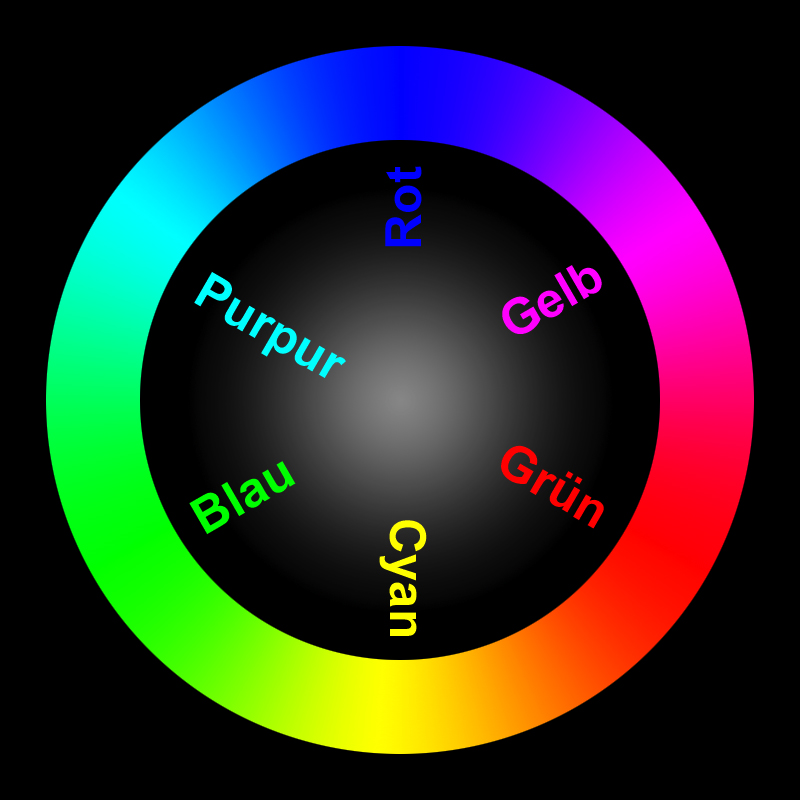
Hier ist dasselbe Bild, direkt auf das Forum hochgeladen:

Wird die Bildverarbeitung mit ImageMagick durchgeführt? Falls ja, gibt es Überlegungen, möglicherweise eine Option hinzuzufügen, um hochgeladene Bilder in sRGB zu konvertieren und sie vor dem Speichern entsprechend zu kennzeichnen?

(Ich würde gerne weiter recherchieren, wenn mir jemand die relevanten Code-Teile nennen könnte, die die Bildkonvertierung beim Hochladen steuern?)

5 „Gefällt mir“

Sure check with @zogstrip.

@zogstrip - is the conversion being done using imagemagick? If so, would you mind pointing me to the relevant section?

It appears that we may only need an option to convert any images to sRGB if they have a different profile embedded, and then either strip the profile or specify that the image is now sRGB.

We do the resizing with convert but then the thumbnail is optimised using optipng.

You will find everything you need to know in OptimizedImage and more specifically

3 „Gefällt mir“

Tested fix:

https://github.com/discourse/discourse/pull/4064

3 „Gefällt mir“

This still does not look fixed to me… I just tried with the image on the OP.

@tgxworld as part of your image magick 7 upgrade can you test this?

3 „Gefällt mir“

This is actually a result of ImageOptim and not ImageMagick. We probably don’t want to be stripping the ICC profile here?

  • :strip — List of extra markers to strip: :comments , :exif , :iptc , :icc or :all (defaults to :all )
3 „Gefällt mir“

Probably :comments is what we want there?

1 „Gefällt mir“

I was thinking about this and this seems very specific to a photography forum. If they want to keep all the metadata/color profile, they can just set SiteSetting.strip_image_metadata to false. For majority of the images, keeping the exif or iptc metadata isn’t going to be very useful.

2 „Gefällt mir“

Interesting @Patrick_David, so this is not really a bug… it is a feature request to allow for fidelity when stripping exif tags (or simply misunderstanding an existing feature)

I am going to close this for now, but feel free to open a new topic if you find setting strip_image_metadata to false unacceptable.

5 „Gefällt mir“